 LumenClip Docs
Media viewers
Modal review and editing surfaces for collection images, generated slideshows, and generated videos.
Route: Modal state from /app?view=home, /app?view=templates, and /app/collections/[id].
Layout
Owners: components/realfarm/image-viewer-modal.tsx and
components/realfarm/slideshow-viewer-modal.tsx.
The collection image viewer fills the viewport with a dark overlay. Close and previous/next controls surround one contained image. Its caption, position in the current image set, and an image-action panel appear below the preview. The panel switches between prompt-based editing and 2x or 4x upscaling and includes the registered image-model choices from the application model registry.
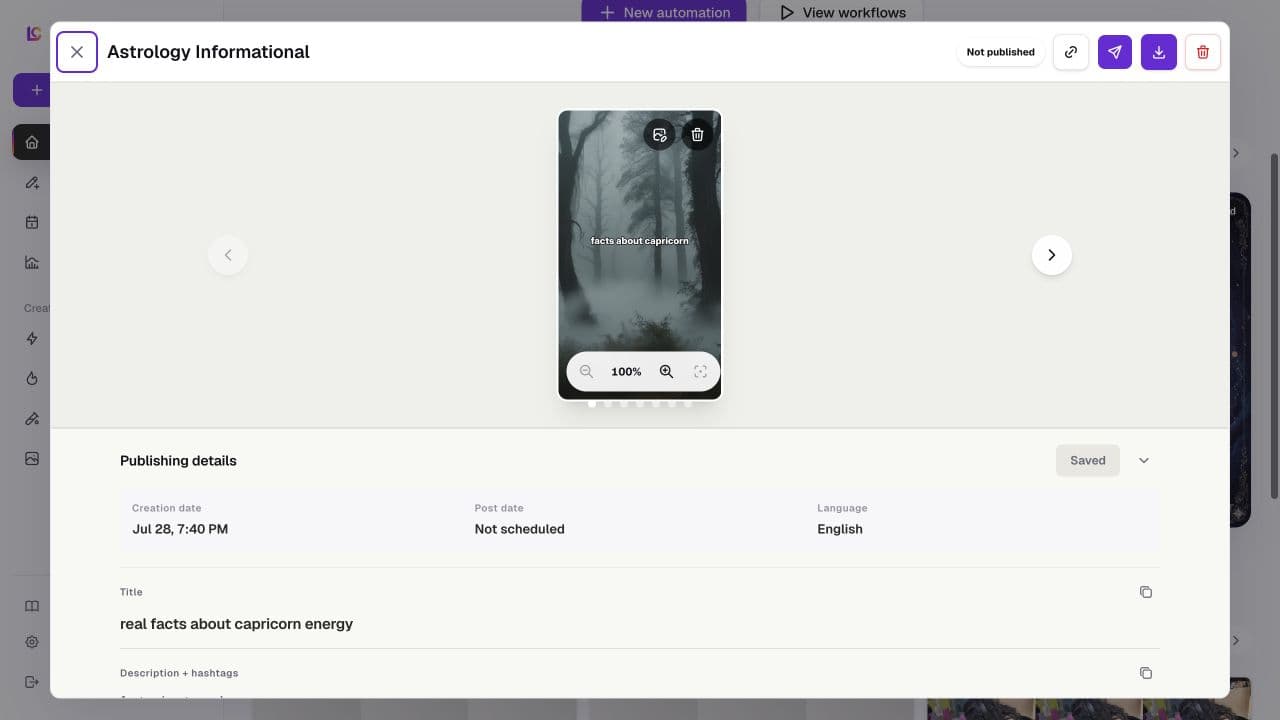
On desktop, the slideshow viewer is a large modal with a header, one centered slide stage, position dots, and a Publishing details panel below the stage. The header contains Close, the output title, caller-supplied publication status and actions, PNG export, and optional generation-debug and whole-output deletion controls. The details panel can show creation date, post date, language, title, description, and hashtags.
On mobile, the slideshow viewer fills the viewport. Previous and next arrows overlay the slide, publication status moves into the stage, and Publishing details opens as a constrained scrolling section beneath it. Edit controls are omitted whenever the parent does not supply the corresponding callback, so template examples and other read-only uses share the viewer without exposing unsupported changes.
The generated video viewer uses a narrower modal whose desktop layout places a vertical player beside status, timing, duration, creation date, type, language, publishing copy, selected-account status, and any run error. A running export shows its current render stage instead of the player, and a run without a video shows an empty state. On mobile the columns become one scrolling flow with the player before the details. The persisted-export viewer uses the same player and copy-field pattern with fewer run details. No mobile screenshot is currently available for these viewer states.
Interactions
The collection image viewer moves between images without wrapping at either end. An editable collection caption changes through the parent collection surface. Image edit submits a non-empty prompt, while upscale submits the selected factor; either successful action replaces the displayed collection image with the returned asset.
The slideshow viewer moves with the previous and next buttons or any position
dot. The stage supports wheel and button zoom, double-click zoom, pointer drag,
two-pointer pinch, keyboard plus and minus zoom, arrow-key panning, and reset
with 0 or Escape. Export downloads the rendered slides as a PNG ZIP, and copy
actions place the title or combined description and hashtags on the clipboard.
For an editable generated slideshow, the user can save title, description, and hashtag changes, choose an unused image from the template's selected photo collections and rerender the active slide, or delete a slide after confirmation. The final remaining slide cannot be deleted. Closing with unsaved metadata invokes a discard confirmation. Whole-output deletion is shown only when the parent marks the completed output eligible, and publication or scheduling actions are supplied by the generated-output wrapper.
Generated videos use native playback controls and read duration from loaded media metadata when available. Their title, description, and hashtags are copyable publishing fields. Completed video deletion is available only when the output is neither scheduled nor published. The viewers consume persisted rendered media; authoritative slideshow and video render configuration remains in the shared renderer and export paths.
MCP coverage
Partial. lumenclip_assets_list retrieves collection assets, while
lumenclip_outputs_list and lumenclip_output_get retrieve generated output
data. lumenclip_output_publish publishes or schedules an eligible output, and
lumenclip_output_delete deletes an unpublished output. Viewer navigation,
zoom and pan, clipboard copy, PNG export, collection-image caption edits,
image-model edit or upscale, slideshow metadata edits, slide-image replacement,
and individual slide deletion remain UI-only.